
Interactive Prompter Link: “What If I Say Yes” Proposal
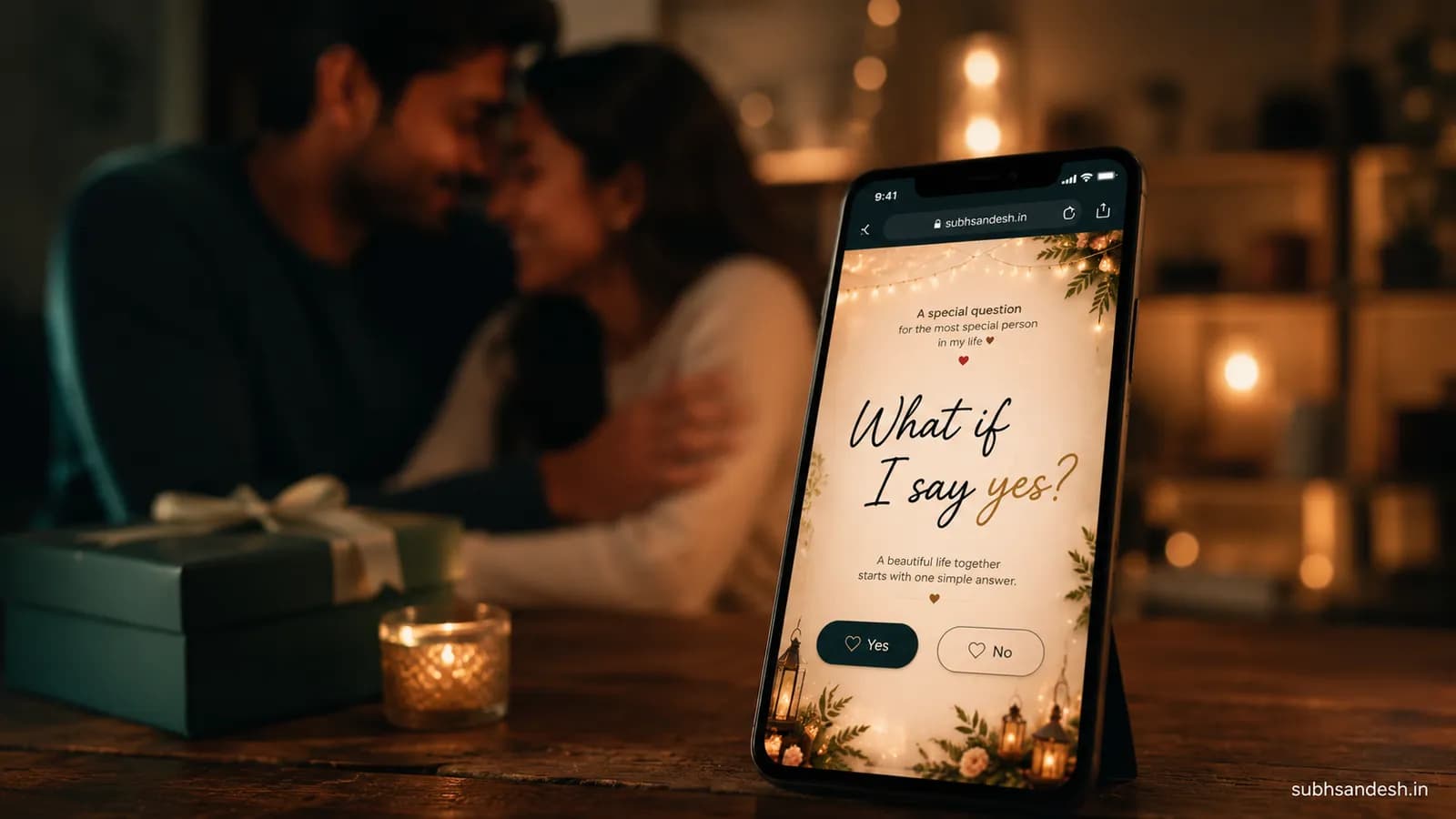
Create a mobile-ready, single-click proposal experience — an interactive prompter link that asks “What if I say yes?” and captures the answer, plays a reveal, and logs the response. Learn the exact steps, copy, media tips, and testing checklist to build and share a convertible proposal page in minut
Make this into a page you can send
Photos, a message, music and a ready-to-share link — in a couple of minutes.
Create nowor browse all occasionsKey takeaways
- • An interactive prompter link titled “What if I say yes” is a one-click mini-site that asks the question, captures the response, and triggers a personalized reveal or action.
- • You can build and publish an interactive proposal link in minutes by choosing a template, adding media and prompts, configuring yes/no actions, previewing across devices, and sharing a short URL or QR code.
- • The three high-impact elements for conversion are a short personal video, a clear single-question prompt, and an immediate celebratory action (confetti, music, or redirect) when the answer is Yes.
- • Test on multiple devices, compress media to mobile-friendly sizes, and include privacy options (password or time-limited link) to protect the surprise.
- • Track responses with simple form captures or webhook notifications to know exactly who said Yes and when — then follow up with an automated message or a booking link.
On this page
Answer-first: An interactive prompter link "what if i say yes" proposal is a single-click, mobile-first mini-site that asks one clear question, captures the response (Yes/No), and immediately triggers a personalized reveal such as a video, confetti animation, or a redirect to book a celebration. Build, test, and share a private proposal link in minutes.
What is an interactive prompter link and why use it for a proposal?
An interactive prompter link is essentially a tiny website optimized for one action: getting a meaningful response. For a proposal, it replaces the paper card or spoken line with a tailored digital experience that can:
- Ask a focused question like “What if I say yes?” and make the moment repeatable.
- Play a personal video message and deliver a reveal only when the visitor answers Yes.
- Capture the timestamped response and notify you instantly so you can follow up.
Why use it? It’s private, trackable, and customizable. If you want the emotional intimacy of a hand-delivered proposal but with modern polish — this is the bridge between surprise and control.
How an interactive prompter link "what if i say yes" proposal works (high-level)
- Create a new proposal project and pick a mobile-first template.
- Add recipient details and upload a short personal video or photo slideshow.
- Write the prompt and one-line context so the question lands emotionally.
- Configure actions for each answer (Yes → celebratory reveal, No → gentle fallback).
- Preview on mobile, compress media, and test the notification flow.
- Publish a protected short link or QR code and share privately.
The rest of this guide walks through each step with practical tips, examples, and a testing checklist you can follow.
Step-by-step: Build your interactive proposal link (numbered how-to)
- Pick a template and theme
Choose a template with large type, a single focal CTA, and a centered media hero. For proposals, minimalist layouts that place your video or photo at the top, followed by a short prompt and two large buttons (Yes / Not yet) convert best.
- Personalize the header and hero media
Record a 20–60 second phone video: look into the camera, say your name and a short line, then pause before the question for dramatic timing. Compress to 720p (≤6–8 MB) for fast mobile playback. Add a fallback hero image for slow networks.
- Craft the prompt text
Keep the prompt to one short paragraph (25–40 words). Use one vulnerability hook + the single question. Example:
"Every day with you has been my favorite. I want to keep choosing you—big and small. What if I say yes—will you marry me?"
- Configure interactive responses
Map actions to each button:
- Yes → play your secret celebration video, animate confetti, and show a next-step CTA (e.g., 'Book dinner' or 'View photos').
- Not yet → show a gentle message and an option to talk later (soft CTA like 'Send a note').
- Add tracking and notifications
Enable response capture with timestamp and the visitor’s device metadata (optional). Configure an instant email or SMS webhook so you’re alerted the second they tap Yes.
- Preview and test
Test across iPhone, Android, and desktop. Use private/incognito mode to verify the experience for first-time visitors and ensure media autoplay and sound adhere to browser rules (usually require user interaction to enable sound).
- Publish and secure the link
Publish a short URL and generate a QR code. Protect the link with a password or single-use token if you want extra privacy.
- Share and follow up
Send the link via a private message, SMS, or a printed card with the QR code. When you receive the Yes notification, follow up with your planned real-world reveal.
HowTo detailed checklist (matching the numbered steps above)
- Template: choose mobile-first, 1 CTA, centered hero.
- Video: 20–60s, 720p, <8MB, MP4 H.264.
- Prompt: 25–40 words, one question.
- Actions: Yes → celebration; No → gentle fallback.
- Tracking: enable timestamp + notification.
- Test: iOS/Android/desktop; test link security.
- Publish: short link + QR + optional password.
- Share: private channel; plan immediate follow-up.
Design and copy examples that convert
Use these micro-templates and adapt them to your voice.
Personal video opener (10–20s):
"Hey [name], it’s me. There’s something I’ve been meaning to say—been feeling it for a while."
Prompt variations:
- Romantic direct: "I want the rest of my life with you. What if I say yes — will you marry me?"
- Playful: "If I said yes, would you… say yes back?"
- Story-led: "After three cities, two dogs, and a thousand nights, here’s one question: What if I say yes?"
Post-Yes reveal copy:
"You said Yes! I love you. Tap below to see the surprise I planned." (then play video or show booking link)
Post-No fallback copy:
"Thank you for being honest. Whenever you’re ready, I’m here to talk."
Technical tips: media, performance, and privacy
- Compress video to 720p H.264 MP4 and aim for <8 MB. Tools: HandBrake or online compressors.
- Host media on a CDN or use the platform’s upload to ensure fast delivery worldwide.
- Autoplay audio typically requires a first tap; design visual confetti and muted video with optional sound button.
- Use a single-use token or password if you’re worried about friends accidentally opening the link.
- Set link expiry if you want the proposal to be discoverable only for a short window.
Comparison table: Link types and when to use them
| Link Type | Best for | Pros | Cons |
|---|---|---|---|
| Short URL (private) | SMS or private message | Fast to send, easy to open | Can be forwarded if leaked |
| QR code on card | Paper surprise reveal | Elegant, physical surprise | Requires recipient to scan |
| Social post (delayed reveal) | Public announcement after Yes | Wide distribution, viral potential | Not private; spoilers possible |
| Password-protected page | High privacy needs | Protects the surprise | Adds friction to opening |
Real-world examples and creative variations
- Hidden Photo Hunt: Embed the link in a printed card; the recipient scans and a slideshow reveals 'Yes' moments followed by your question.
- Venue Trigger: Publish the link and give to a friend who is at the venue; when they press Yes, a prearranged musician starts to play.
- Family Announcement Path: Configure Yes → redirect to a family gallery webpage where select photos load as the announcement.
Privacy, etiquette, and legal notes
- Keep the link private until the moment you intend. Use short life spans or single-use codes for extra safety.
- If you capture personal data, tell the recipient what you store and why. Avoid sharing their private response publicly without consent.
- In some jurisdictions, recording or storing personal data may trigger legal obligations — keep it minimal and private for a proposal.
Testing and QA checklist before you share
- Open link on iPhone and Android (cellular + wifi)
- Confirm video loads and plays within 5 seconds on mobile
- Ensure buttons are large enough to tap with one thumb
- Validate notification/email alert fires on response
- Test password or single-use code if enabled
- Verify fallback path for No is considerate
Example timeline: how to deliver the link in a surprise proposal
1 day before: Create and publish the link. Send a test link to a trusted friend for feedback. A few hours before: Move the link to a private place; prepare backup plan in case of tech issues. The moment: Hand over the phone or present the QR on a card. Celebrate and follow up after the Yes notification.
Pricing and platform considerations (what to look for in a builder)
Look for platforms offering:
- Mobile-first templates designed for a single CTA.
- Conditional actions (Yes/No) and customizable post-response behavior.
- Short links and QR generation with password/single-use options.
- Response tracking and notification webhooks.
- Media hosting on a CDN for fast mobile playback.
If you plan to create multiple proposals (e.g., for clients or events), choose a platform that allows duplication of projects and team access controls.
Example: exact flow and the copy you can paste
- SMS to send: "Open this when you’re ready. I have one question for you: [short link]"
- Phone video script (20s): "Hey [name], it’s me. These last years made one thing very clear to me. I want to be with you in every small and big way. What if I say yes — will you marry me?"
- Yes action: play 30s montage → show 'Call me' button → send email to you.
Common mistakes and how to avoid them
- Too-long videos: Keep it under 60s to avoid buffering delays.
- No testing on slow connections: Always test on 3G/4G and with low battery modes.
- Complex multi-step flows: The best proposal pages are one question and one immediate emotional reward.
Next steps: Create your interactive prompter link now
If you want to turn this idea into a real link today: pick your template, record a short video, and follow the numbered how-to steps above. Publish a single-use link, test on your phone, and deliver the surprise privately.
Thank you for trusting this guide — may your moment be exactly how you imagine it.
Soft CTA: Ready to create yours? Start with a template, upload a short video, and publish a private short link in minutes for a secure "What if I say yes" proposal experience.
Frequently Asked Questions
Turn this inspiration into an unforgettable surprise
Build a page with photos, a heartfelt message, music and a ready-to-share link.
- Photos, message & music
- Ready-to-share link

Written by
Suyash Agrahari
Founder
Suyash Agrahari is a Software Engineer at HireQuotient and the founder of SubhSandesh and DrawFlow (drawflow.in). He builds AI agents and full-stack products with Next.js, Node.js, and the OpenAI and LangChain ecosystems, having shipped autonomous multi-agent systems, AI copilots, and large-scale outreach platforms — and scaled side projects from a few hundred to millions of users. He writes about AI engineering, web development, and building products that grow through SEO and organic reach.
Stay Connected
Follow SubhSandesh
New templates, festival ideas and step-by-step walkthrough videos — first on our socials.
Keep reading
Which Day Comes After Propose Day, and What Happens Now
Chocolate Day comes after Propose Day — Tuesday 9 February 2027. That is one sentence, so this page covers the four situations you are actually in on …
 Suyash Agrahari· 9 min
When to Propose a Girl to Be Your Girlfriend, and When Not To
The timing question, answered with conditions instead of a date: what has to be true before you ask, what politeness and fast replies do not prove, wh…
Suyash Agrahari· 9 minRomantic Proposal Room Decoration: What the Room Must Do
Romantic proposal room decoration, sorted by the work each setup takes and what the room allows: 7 setups with set-up and reversal times, lighting evi…
Suyash Agrahari· 9 min