Milestone Birthdays

    Birthday Social Media Template: Make a Shareable Birthday Page

    Create a beautiful, shareable birthday social media template that looks custom-made in minutes. Learn the easiest step-by-step way to design, personalize, and privately share a birthday page (photos, music, countdowns) — plus template ideas and expert tips.

    Suyash Agrahari· 6 min read

    Key takeaways

    • A birthday social media template is a ready-made web page you personalize with photos, a message, music and a countdown to share privately or on social platforms.
    • You can build a shareable birthday page in about 10–20 minutes by choosing a template, adding photos and text, customizing music and previewing on mobile.
    • Use clear photos, one heartfelt message, and a short song clip to make the template feel intimate rather than noisy.
    • SubhSandesh offers mobile-friendly birthday templates that let you add photos, music, timers and mini-games and publish a private share link instantly.

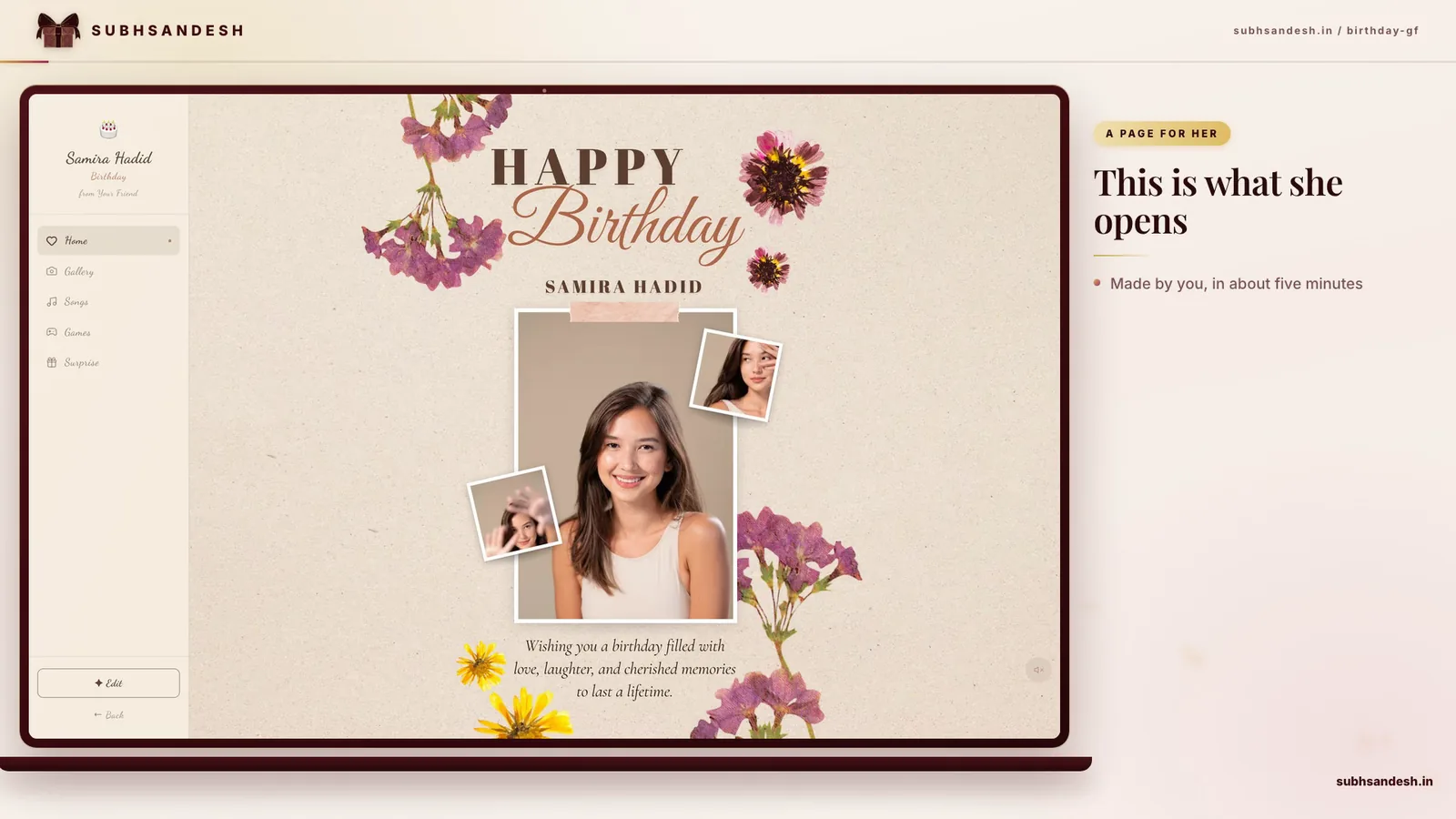
    Answer-first: A birthday social media template is a ready-made, mobile-friendly web page you personalize with photos, a message and music, then share as a private link or on social apps. Use one to create a memorable, polished birthday surprise in minutes without design skills.

    Why use a birthday social media template instead of a simple message?

    A template gives you a mini-celebration space where images, music and timing work together. Instead of one text or a single image, you can present a short story: a lead photo, a heartfelt paragraph, a favored song clip and a countdown to the moment. That layered presentation feels more intentional and often becomes a keepsake the recipient revisits.

    Emotional impact in one view

    On a phone screen you get a clean, immediate emotional hit: a smiling photo, a name, and a line that says exactly what you feel. That’s more memorable than a text thread that gets buried.

    Faster and more polished than DIY design

    Templates remove guesswork. Choose a layout, add assets and preview. With a good template gallery you can test three looks in five minutes and pick the one that best matches the relationship.

    How to build a shareable birthday social media template (step-by-step)

    Follow these numbered steps to create a birthday page that looks custom-made and loads fast. These steps match the quick HowTo checklist later in structured data.

    1. Choose the right template for the person. Pick a layout that fits their personality—romantic and minimal for a partner, fun and colorful for a friend.
    2. Collect 3–6 photos and a short song clip. Pick well-lit photos and a song of 20–40 seconds for fast playback.
    3. Write one strong message. Keep it short: 25–60 words that name a memory or a reason you care.
    4. Customize visuals and choose a cover photo. Make sure the first image is the one you want them to see.
    5. Add a countdown or interactive surprise if you want a reveal moment.
    6. Preview on mobile, adjust, publish and share the private link with a chosen group.

    Quick pro tip

    If you have multiple contributors, gather content ahead of time in a shared folder so you can assemble the page in one sitting.

    Choosing the perfect template

    Consider these practical questions when picking a template:

    • Who is the recipient? Partner, parent, best friend—each needs a different tone.
    • How do they like to be surprised? Subtle and private or playful and public?
    • Will guests add messages or just view the page? Choose templates with a guestbook or comments if you want others to contribute.

    If you want relationship-specific picks, browse a curated gallery to find designs keyed to the recipient. For example, look at a dedicated birthday layout for a girlfriend: https://subhsandesh.in/birthday-gf, or choose a playful template for a best friend: https://subhsandesh.in/birthday-bestfriend.

    What to include on the birthday page (must-have elements)

    • Lead photo: clear, smiling close-up.
    • Short headline: the person’s name or a two-word greeting.
    • Heartfelt message: 25–60 words.
    • Photo gallery: 3–6 images that tell a story.
    • Music: a 20–40 second clip with controls.
    • Countdown: optional, for a reveal at the exact moment.

    Example layout checklist

    ElementPurposeTime to prepare
    Lead photoImmediate emotional connection1–2 min
    One-sentence headlineClarity and tone1 min
    Short messageHeart of the page5–10 min
    Gallery (3–6 images)Visual memory thread5–10 min
    Music clip (20–40s)Ambience and memory2–3 min

    This compact table helps you allocate time and focus on what matters.

    Design tips that make the template feel handcrafted

    • Use one strong font and avoid mixing more than two typefaces.
    • Keep colours simple. Choose a palette of two colours plus neutral background.
    • Avoid overuse of animation—subtlety reads as elegance.
    • If you want a more personal touch, scan a handwritten note and include it as an image.

    Photo and audio optimization

    Compress images to keep them under 1MB each. Trim audio to 20–40 seconds for a fast loading experience. If you use long songs, guests may have to wait for buffering, particularly on slow mobile data.

    How to keep the surprise private and secure

    1. Use the platform’s private link or password option if available.
    2. Share the link only by DM or a closed group chat, not on public feeds.
    3. Ask contributors not to post the link until the reveal.
    4. Test the link on an incognito window to ensure it isn’t indexed.

    Privacy matters because a private surprise can be ruined by early sharing. A controlled release keeps the moment special.

    Real-world examples and template ideas

    • Minimal romantic page: one portrait, a soft piano clip, a short love note and a countdown to midnight. Ideal for a partner.
    • Group gift page: a gallery of photos, a list of contributor messages and a link to a group gift or registry.
    • Nostalgia collage: a sequence of childhood photos, a vintage filter and a voice clip you recorded wishing them well.

    If you'd like relationship-specific starters, try a birthday page for a friend or parents: https://subhsandesh.in/birthday-friend or https://subhsandesh.in/birthday-parents.

    Testing and publishing checklist

    • Preview on Android and iPhone for layout and music behavior.
    • Click every link and button to make sure nothing is broken.
    • Confirm countdown timezone and target time.
    • Double-check message spelling and contributor credits.

    Once everything looks right, publish and share the private link. If you want to polish further, you can always edit the page and update instantly.

    Common mistakes to avoid

    • Overloading the page with many long audio tracks.
    • Using too many images that slow the page.
    • Crafting a message that’s too long to read on a quick mobile visit.
    • Forgetting to preview on a phone before sharing.

    How SubhSandesh makes this effortless

    At SubhSandesh we built templates specifically for fast, heartfelt surprises. Pick a design, upload photos, add a message and a song, and publish a private link within minutes. Our gallery groups templates by relationship and occasion so you don’t waste time hunting for the right look. Browse all templates here: https://subhsandesh.in/templates.

    Final tips to make it unforgettable

    • Keep the first screen simple and personal—this is the memory that sticks.
    • Use a single line that names a shared memory to make the recipient feel seen.
    • Coordinate with one close friend to ensure the reveal moment works smoothly.

    Ready to make their day? Create your free SubhSandesh birthday page in minutes from a curated template and share the private link with the people who matter: https://subhsandesh.in/templates.

    #birthday#templates#digital-greeting#social-media#personalization

    Frequently Asked Questions

    A birthday social media template is a ready-designed web page layout you personalize with a photo, message, and music to share on social platforms. It saves time and ensures the result looks polished across phones and desktop without needing design skills or special software.
    Start by picking a template that matches the recipient’s style, add 3–6 photos, write a short heartfelt message, choose background music and set a countdown if you want. Preview on mobile, publish, and share the private link with friends or post it on social platforms.
    Yes. Most birthday templates are web pages you link to from Instagram bio, stories, DMs or WhatsApp. Share the page link directly in messages or add it to a social post; recipients open the full experience in their mobile browser without installing an app.
    A well-built birthday template is responsive and optimized for mobile browsers so it looks great on phones and tablets. Mobile-first design ensures photos, text and music controls are easy to tap and that animations remain smooth on small screens.
    You can build a polished birthday page in 10–20 minutes if you have photos and a song ready. More elaborate customizations or writing several messages may add time, but a lovely, shareable page is fast to make.
    Yes, most templates let you add a short song or instrumental loop. Pick a 20–60 second clip so the page loads quickly and doesn’t autoplay loudly. Many builders include a simple music upload or URL field you can use.
    A short, focused message usually reads better on mobile: one heartfelt paragraph of 25–60 words works well. Save longer memories for a dedicated section or a linked gallery so the opening feels immediate and emotional.
    Choose 3–6 high-quality photos that tell a simple story: one close-up, one candid smile, one group or activity shot. Avoid heavy filters and make sure faces are clear on small screens. Crop to a 4:3 or square ratio for consistent layout.
    Yes—you should always preview. Open the page in a mobile browser and test music, image loading, countdowns and any buttons. Previewing avoids surprises like broken images or autoplay issues when you share the link.
    You can browse ready-made birthday templates in one place like the SubhSandesh templates gallery to find layouts for a partner, friend or parent. These are designed for quick personalization and mobile sharing: https://subhsandesh.in/templates.
    Many platforms offer free templates with basic features while charging for premium styles or extra options. Free templates generally include core personalization like photos, text and a shareable link; check the platform’s pricing for advanced features.
    Use the platform’s privacy controls: publish a private link rather than an indexed page, restrict access with a password if available, and share only with chosen contacts. Avoid posting the link publicly if you want it seen only by friends or family.
    Yes—countdown timers are a popular feature that builds excitement. Set the timer to the birthday date and time so visitors see days, hours, minutes remaining. Timers also make the page feel timely when used for a planned surprise moment.
    Use JPG or PNG for best compatibility. Aim for images under 1MB each to keep the page fast on mobile. If available, mobile builders often compress images automatically but start with clear, well-lit shots for best results.
    Yes, most services let you edit after publishing so you can fix typos, add photos or change the song. Edits usually update instantly for anyone who opens the link, which is useful if you want to add last-minute surprises.
    Personalization comes from small, specific details: reference an inside joke, include a photo from a meaningful trip, choose a song they love, and write a sentence that names a memory. Specificity makes the page feel handcrafted, even when built quickly.
    Short headlines, a strong lead photo, an immediate message, visible music controls and one clear call-to-action (like 'Open Surprise') keep attention. Avoid long blocks of text and too many animation effects that slow loading.
    Yes, many templates let you embed or upload a short video clip. Keep videos under 30–60 seconds and compressed for quick playback on mobile. Use an MP4 format or an embedded link from a supported hosting service if available.
    Keep social captions short: mention who it’s for, add an emoji or two, and invite people to view the surprise. Example: 'Surprise for Rahul 🎉 — open the link and drop your birthday wish!' This encourages clicks and comments without oversharing the surprise.
    Compress images to under 1MB, trim audio to 20–40 seconds, avoid heavy animated backgrounds and use lazy-loading features if available. Fast-loading pages increase the chance the recipient opens the surprise immediately.
    A template offers a richer, more emotional experience than a plain text message because it combines photos, music, and layout. It’s especially memorable for close relationships where the extra effort shows thoughtfulness.
    Some templates include a comments area or a lightweight guestbook where friends can leave wishes. If not built in, you can link to a shared group chat or a Google form from the page. Choose the method that keeps the surprise intact.
    Match the recipient’s personality: playful and short for casual friends, warm and intimate for partners, respectful and grateful for parents. The right tone makes the message land naturally and avoids awkwardness.
    Aim for 3–6 photos to tell a quick visual story: a portrait, a candid, and a memory shot. This keeps the page focused while giving variety. Use more photos in a dedicated gallery if you want a deeper retrospective.
    Yes, responsive templates adapt to desktop and mobile so the layout rearranges elegantly on larger screens. Desktop viewers see larger images and more whitespace, but always confirm the preview on both device types.
    Some platforms offer scheduled publishing so a page appears at a chosen date and time. If scheduling isn’t available, prepare and publish manually shortly before you want guests to see it and share the link at the right moment.
    Avoid exposing the recipient’s full name in a public URL if privacy matters. Use private links or obfuscated slugs to keep the surprise secure. If privacy isn’t a concern, a friendly slug can make the link feel personal.
    Preview the page on a mobile browser and check whether music plays automatically or waits for a tap. Test with the device’s sound on and off. Adjust the audio settings or choose a short clip if autoplay is blocked by the browser.
    Yes, many templates allow basic emoji in text fields and some include decorative stickers or confetti effects. Use them sparingly—one or two well-placed emoji often enhances tone without making the design look cluttered.
    Avoid large blocks of private information, very high-resolution images that slow loading, and autoplaying long audio. Also avoid controversial jokes or anything that could embarrass the recipient in front of others.
    Share the private link via direct messages, a closed WhatsApp group, or email. If you want to limit access, set a password or publish only when you're ready and remind recipients not to forward the surprise link publicly.
    Yes—add a printable PDF or a downloadable image linked on the page so guests can save or print a physical card. This bridges digital and physical gifting and gives an option for those who prefer tangible keepsakes.
    Yes, platforms often have tailored templates for different relationships, like romantic layouts for partners and respectful, warm designs for parents. SubhSandesh offers targeted templates such as a romantic birthday page for a girlfriend (https://subhsandesh.in/birthday-gf) and family-focused styles.
    Some services let multiple people contribute photos and messages before publishing, or you can collect contributions separately and assemble them yourself. Collaboration works well for milestone birthdays where many friends want to add wishes.
    Security varies by provider. Look for platforms that provide private links, optional passwords and HTTPS. Avoid entering sensitive personal data on a public page and confirm the builder’s privacy policy if you plan to store guest details.
    Use candid recent phone shots, scan printed photos, or choose a clean, text-first template that emphasizes the message. Many platforms offer built-in stock images you can use temporarily or as background to complement your own pictures.
    Keep the link private until the reveal, ask contributors not to share it, and choose an unveiling moment like midnight or during a virtual call. A short countdown on the page adds a dramatic, celebratory moment when they open it.
    Some platforms provide basic analytics like views and referrers. If tracking is important, use a builder with view counts or link-tracking features, but respect privacy and only track what contributors agree to.
    Yes—include a small button linking to a gift registry, donation page, or payment link. Make it optional and clearly labeled so visitors understand it’s a celebratory add-on, not a required action.
    Use alt text for images, readable fonts, strong contrast, and avoid text embedded in images. Keep navigation simple and provide a clear linear flow so visitors using screen readers or assistive tools can enjoy the page.
    Yes—choose a template with the visual style that fits your theme and add themed photos, icons and a matching song. Many template galleries tag designs by mood so you can quickly find travel, retro or cinematic styles.
    Simplify the page by removing heavy background images, reduce the number of animated elements, and use standard image sizes. Preview on the older device and adjust settings until the page loads smoothly and all elements are tappable.
    Yes—consider a small puzzle, quiz or an image that reveals a message when clicked. Keep it simple so it’s fun rather than frustrating. Hidden surprises make the experience interactive and memorable.
    Choose a song that means something to the recipient—an upbeat favorite, a meaningful lyric, or a gentle instrumental. Keep clips short and ensure you have the right to use the audio if the platform requires it.
    Yes. SubhSandesh supports small interactive elements and playful features to make pages more engaging. You can add mini-games, a countdown, and clickable reveals to create a lively surprise that feels handcrafted and fun.
    SubhSandesh typically asks for minimal sign-up to save and publish pages, which keeps your projects private and editable. Signing up lets you manage links, edit later, and access the full template gallery: https://subhsandesh.in/templates.
    Add a small 'Credits' section near the bottom of the page listing photographer names and contributors. This honors people who helped and keeps the design transparent while preserving the celebratory focus at the top of the page.
    Some builders allow exporting a printable version or saving key sections as a PDF. If export isn’t available, take a high-resolution screenshot and create a printable card from that image, checking layout and cropping first.
    Shareable emotion, a memorable reveal, and strong visuals help. Templates that capture a heartfelt moment or a clever surprise encourage friends to reshare. But viral moments are rare; focus on making it meaningful for the recipient first.
    Schedule the reveal for the recipient’s local time and confirm contributors know the timing. If scheduling tools aren’t available, publish a few minutes before the intended moment and coordinate with a close friend to trigger the reveal.
    Yes—platforms often offer milestone-specific templates with celebratory visuals and sections for memories. Choose a template that reflects the milestone’s tone: playful for younger birthdays, elegant for 50th or retirement celebrations.
    Yes—slideshows are a common feature. Build a short slideshow of 8–12 images that auto-advance with gentle transitions and include pause controls so viewers can linger on favorite photos.
    Open the page link on at least one Android phone, one iPhone and a desktop browser. Ask a trusted friend to check on another device. Testing ensures photos, music and layout look consistent across platforms.
    Yes—SubhSandesh curates templates by relationship and occasion to speed your choice. Browse categories like a birthday page for a girlfriend (https://subhsandesh.in/birthday-gf) or for a best friend (https://subhsandesh.in/birthday-bestfriend) to find a fitting style quickly.
    Tell contributors explicitly not to post the link publicly, use private messaging for sharing, and avoid uploading the page link to social feeds until after the reveal. A short reminder to friends helps prevent accidental spoilers.
    Quick checklist: preview on mobile, confirm photos load, test audio, verify countdown time, set privacy settings, and double-check message text. A five-minute run-through ensures a smooth, joyful reveal without last-minute surprises.
    Scan or photograph a handwritten note and upload it as an image, or use a handwriting-style font if the builder supports custom fonts. A real handwriting image adds warmth and a tactile feel to the digital page.
    SubhSandesh

    Turn this inspiration into an unforgettable surprise

    Build a page with photos, a heartfelt message, music and a ready-to-share link.

    • Photos, message & music
    • Ready-to-share link
    Create nowSee all occasions
    Suyash Agrahari

    Written by

    Suyash Agrahari

    Founder

    Suyash Agrahari is a Software Engineer at HireQuotient and the founder of SubhSandesh and DrawFlow (drawflow.in). He builds AI agents and full-stack products with Next.js, Node.js, and the OpenAI and LangChain ecosystems, having shipped autonomous multi-agent systems, AI copilots, and large-scale outreach platforms — and scaled side projects from a few hundred to millions of users. He writes about AI engineering, web development, and building products that grow through SEO and organic reach.

    Keep reading