Milestone Birthdays

    Birthday Website Template Free — Create a Shareable Birthday Page

    Find a free birthday website template that makes a beautiful, shareable birthday page in minutes. This guide shows quick step-by-step setup, creative ideas, and why SubhSandesh templates are ideal for partners, friends and parents.

    Suyash Agrahari· 5 min read

    Key takeaways

    • A birthday website template free lets you build a beautiful, shareable page with photos, music and countdowns in under 10 minutes.
    • Pick a template that fits the relationship—girlfriend, best friend or parents—to personalize tone, colors and imagery quickly.
    • You can use free templates from SubhSandesh to add music, timers and private sharing without coding or design skills.
    • A clear three-step process—choose template, add media/message, publish—keeps the build fast and emotionally powerful.
    • Free templates are ideal for last-minute surprises and work well on mobile, WhatsApp, and email links without attachments.

    Use a birthday website template free to create a beautiful, shareable birthday page in minutes—no design skills required. A good free template gives you the layout, fonts and playful features like music and countdowns so you can focus on the message.

    Why choose a free birthday website template?

    A free birthday website template saves time, removes design guesswork, and delivers a mobile-friendly page that feels polished. Templates give you pre-made sections for a hero image, a heartfelt message, a photo gallery and a countdown—everything a memorable digital surprise needs.

    When a free template makes sense

    • You’re short on time and want a quick surprise.
    • You don’t want to learn design tools.
    • You need a page optimized for mobile and messaging apps.

    A template lets you focus on the story—your message and photos—while the layout handles the rest.

    What to look for in a free birthday website template

    Design elements that matter

    • Clear headline and strong hero photo area.
    • Mobile-optimized layout and fast load times.
    • Media support: music, video and multiple photos.
    • Privacy options: unlisted link or password protection.

    Tone and relationship fit

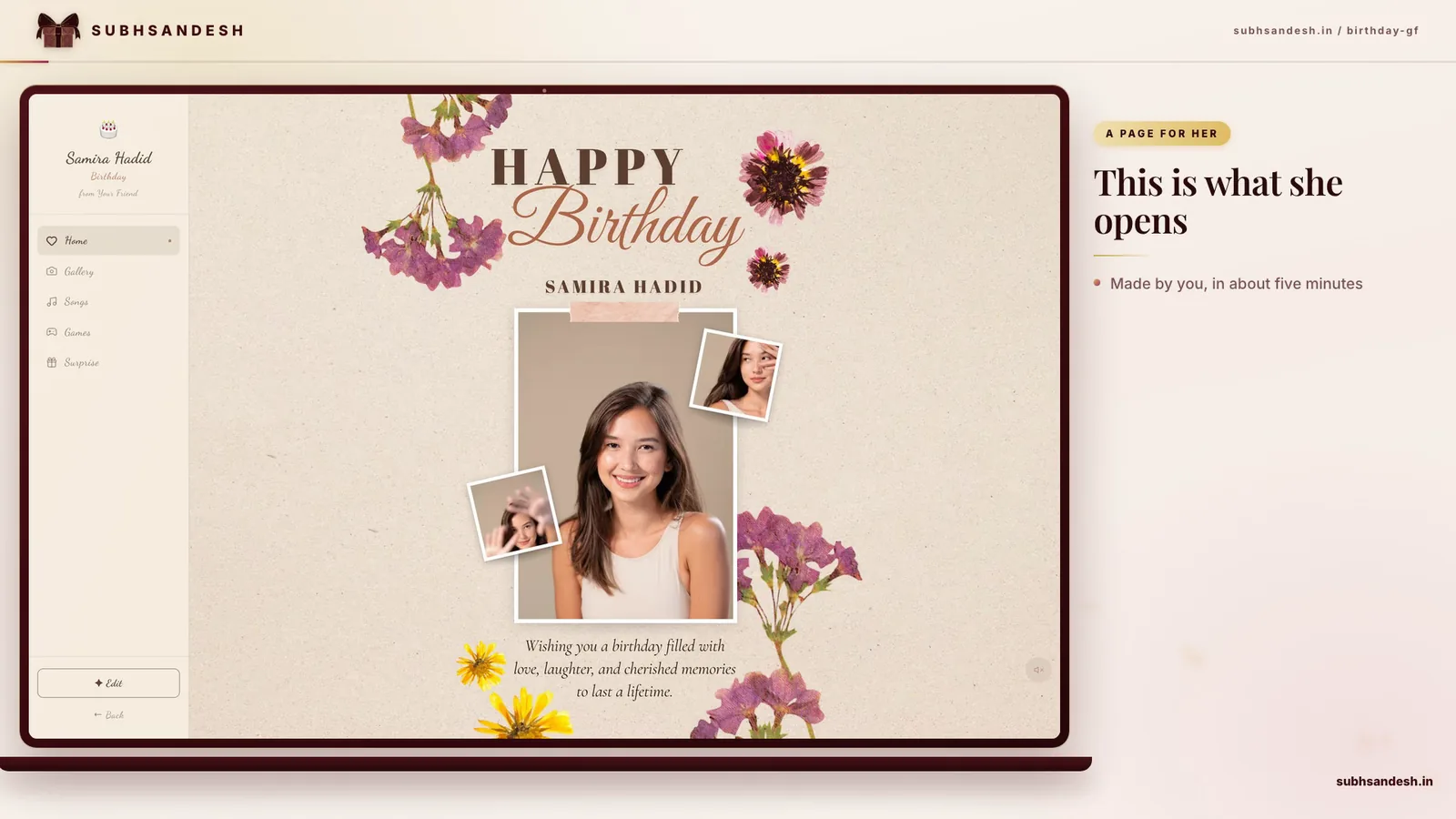
    Pick a template that matches the recipient: romantic styles for partners, playful layouts for friends, and elegant, respectful designs for parents. For example, if you’re making something special for your girlfriend, try the tailored Birthday surprise page for a girlfriend/partner.

    How to build a beautiful birthday page in 7 simple steps

    Follow these steps to turn a free template into a heartfelt birthday surprise. This step-by-step approach mirrors what thousands of SubhSandesh users do when they create a page.

    1. Choose a template and open the editor.
    2. Upload a hero photo, 3–6 gallery images and a short video if you have one.
    3. Write a concise, personal headline (one line) and a 2–4 sentence message.
    4. Add background music or a short playlist and set a countdown to the birthday time.
    5. Arrange images in narrative order; crop to similar aspect ratios for consistency.
    6. Preview on mobile and desktop; test music and video playback.
    7. Publish the page as an unlisted link and share privately at the right moment.

    Quick tips for each step

    • Step 1: Browse templates to match tone; check Birthday page for a best friend if you want playful visuals.
    • Step 2: Use photos with clear faces and good light; compress large files for faster loading.
    • Step 3: A headline like "Happy Birthday, Riya!" and a short memory make the page feel personal.
    • Step 4: Pick a 30–90 second track to avoid autoplay issues on mobile.
    • Step 6: Send the draft link to one test phone for a final check.

    Feature comparison: free template vs DIY vs printed card

    FeatureFree Birthday Website TemplateDIY Graphic (Photoshop/Canva)Printed Card
    Speed to createUnder 15 minutes30–90 minutesSeveral days to print/deliver
    Mobile viewingExcellentDepends on exportRequires photo attachments
    Interactivity (music/video)YesLimitedNo
    Privacy & sharingPrivate linkFile attachmentPhysical only
    CostUsually freeSoftware/skills neededPrinting/postage costs

    This table shows why free templates are ideal for quick, interactive birthday surprises.

    Creative ideas that work with free templates

    • Memory timeline: arrange photos chronologically with captions.
    • Surprise video montage: embed a 60–90 second clip of friends saying hi.
    • Scavenger hint: hide a final surprise link (like a scavenger hunt clue) behind a button.
    • Group-signed gallery: upload short video or photo messages from others.
    • Countdown reveal: publish earlier but ask them to open during a countdown for dramatic effect.

    Practical tips to keep the page smooth

    • Compress images and keep music short. Large files slow load times on mobile.
    • Use consistent aspect ratios for gallery images—square or 4:3 works well.
    • Test on at least one Android and one iPhone to confirm playback and fonts.
    • If privacy matters, use an unlisted link and avoid public sharing.

    Why SubhSandesh templates make this easier

    SubhSandesh templates are built for emotional clarity—places for your message, hero photo, music and a timer that look great on mobile. You can start from a relationship-specific template like Birthday page for a friend or Birthday page for parents and have a polished page live in minutes.

    Real example: a 10-minute birthday surprise

    1. Open SubhSandesh and pick a birthday template. (2 minutes)
    2. Upload one hero photo and three gallery images. (3 minutes)
    3. Type a short headline and a 3-line message. (2 minutes)
    4. Choose a song and set a countdown. (2–3 minutes)

    Total: about 10 minutes, and you have a private link to send when you’re ready.

    Troubleshooting common issues

    • Slow loading: compress photos and remove heavy animations.
    • Music not playing: include a visible play button; mobile browsers may block autoplay.
    • Layout breaks on mobile: preview and simplify content; reduce columns or wide elements.

    Privacy and sharing best practices

    • Create the page as an unlisted link for private sharing.
    • If the builder permits, enable password protection for added security.
    • Share via direct message or email rather than posting publicly when the surprise should remain intimate.

    Ready to make their day?

    A birthday website template free can turn a few photos and a short note into a moving, shareable surprise. Pick a template that matches your recipient—partner, friend or parents—customize it with photos and music, preview on mobile, then publish the private link. Browse all templates at https://subhsandesh.in/templates and create your page in minutes. SubhSandesh makes the process quick, heartfelt and easy to share.

    #birthday-templates#digital-cards#free-templates#surprise-ideas#SubhSandesh

    Frequently Asked Questions

    A birthday website template free is a ready-made webpage design you can use without paying to create a personalized birthday greeting. Templates include layouts for photos, messages, music and countdowns so you can build and share a polished page quickly without coding or design work.
    Choose a free template, add your photos and message, pick background music and a countdown, then publish the link. Using a builder like SubhSandesh, you can complete these steps in under 10 minutes and share the private URL by WhatsApp, message or email.
    Yes, good free templates are responsive and optimized for phones and tablets. They automatically adjust images, fonts and buttons for smaller screens so recipients can open the birthday page on WhatsApp or mobile browsers without layout issues.
    Yes. Most free templates allow you to upload or pick a background song to autoplay or play-on-click. Choose a short track that fits the mood—playful, romantic or nostalgic—and test playback on mobile to ensure smooth experience.
    A birthday webpage can be private if the builder gives you an unlisted link and the option to set a password or view limit. Always check privacy settings; many builders, including SubhSandesh, let you publish a private link you share only with select people.
    Yes. Free templates typically include galleries, sliders and image placeholders so you can add several photos. Choose high-quality images, compress them for web, and arrange them in a narrative order—childhood to present—to make the page feel personal and heartfelt.
    Yes. SubhSandesh offers free birthday templates that let you build, personalize and publish a shareable page without coding. The platform focuses on quick, emotional pages for partners, friends, and parents with features like music, timers and private links.
    Pick a template with romantic colors, soft typography and space for a love message and photos—SubhSandesh’s [Birthday surprise page for a girlfriend/partner](https://subhsandesh.in/birthday-gf) is tailored for that tone and includes music and countdown features ideal for proposals or intimate surprises.
    Yes. A single link sent into a group chat gives everyone the same surprise experience. Use a template that supports galleries and a clear headline so group members can see photos and contribute comments or reactions after you share the page.
    Aim for photos under 1–2 MB and music under 3–5 MB when possible. Compress large files to balance quality and loading speed—fast load times keep the surprise smooth, especially on mobile data connections.
    With a good template and organized assets, 10–20 minutes is enough. Experts at SubhSandesh help users finish in under 15 minutes on average: pick a template, drop in photos, write a short heartfelt message and publish the link.
    Some builders offer scheduling so the page publishes automatically at a set time. If scheduling isn't built in, you can publish ahead and share the link at the exact moment, or set an expiry to keep the page available only on the birthday.
    Most free birthday templates are not focused on public SEO; they're designed to be private and shareable. If you want a page indexed, choose public settings, add descriptive text and titles, and ensure the builder allows search engine visibility.
    Yes—many builders let you update content after publishing. Edits typically preserve the same link, so you can add photos or fix typos without resending. Confirm with your platform whether changes propagate immediately or need republishing.
    Free templates provide core layouts, images and basic features like galleries and music. Paid templates often unlock premium visuals, advanced animations, more storage, custom domains, or scheduling. For most heartfelt pages, a free template is sufficient and simpler to use.
    Yes—templates can be repurposed for event invites by adding date, time, location and RSVP instructions. Use clear buttons or links for guests to confirm, and include a map or contact details if you expect replies.
    Yes. The page URL can be pasted into WhatsApp; recipients open it in their mobile browser. Ensure the page is lightweight and mobile-optimized so it loads quickly when opened from a messaging app.
    Match the tone to your relationship—playful for friends, romantic for partners, respectful and warm for parents. Select template colors, fonts and photos that reinforce that tone. Preview on mobile to ensure the voice and visuals read clearly at smaller sizes.
    Yes. Many free templates accept embedded or uploaded video. Keep videos short (30–90 seconds), use a clear first frame, and host them in a common format like MP4 to ensure playback across devices.
    Short, authentic messages often land better: a heartfelt opening, one or two personal examples, and a warm closing. If you want length, use a 'read more' section or a gallery of short notes and captions to keep the layout scannable.
    Preview on desktop and two mobile devices, test music and video playback, check image quality and loading, and send the link to a trusted friend to confirm the experience. Quick tests catch layout or permission issues before you surprise someone.
    Some platforms allow password protection on free pages; others reserve it for paid tiers. If privacy is essential, check the builder's settings and consider an unlisted link plus a lightweight password when available.
    Use a strong headline, a vivid story or memory, and add small touches like a favorite quote or shared playlist. Even one meaningful photo, paired with a sincere message and music, can create a deeply personal moment.
    Removing branding is often a paid feature. Free pages may include a small builder credit. If a clean presentation matters, check the platform's upgrade options or pick templates with minimal visible branding.
    Good templates follow accessibility best practices—large readable fonts, high-contrast colors, and alternative text for images. Test with zoom and screen readers; if accessibility is a priority, choose templates advertised as accessible or contact support for guidance.
    Builders usually provide multiple birthday templates categorized by relationship and style—romantic, playful, elegant, or family. SubhSandesh maintains a curated set of templates for girlfriends, friends and parents to match different occasions.
    Yes. You can compile messages from multiple people as images or short text blocks and place them on the page gallery. Alternatively, gather signatures in a shared document and upload as a single image to the template.
    Many templates accept any language you type into text fields. They may not translate automatically, so input the language you want. Ensure fonts support special characters if you use regional scripts.
    Use consistent fonts, limit colors to two or three, crop photos to similar aspect ratios, keep messages brief and use a single focal image at the top to draw attention. Small, consistent choices make the page feel intentionally designed.
    Yes if you optimize assets: compress photos, choose short music files, and avoid heavy animations. Many free templates are already optimized; still, reducing file sizes improves load times for recipients on mobile data.
    Most builders include device previews for desktop, tablet and mobile. Use these to check layout, test interactions, and ensure important elements like the message and call-to-action remain visible on small screens.
    Limits vary by platform. Some builders allow multiple free pages under one account; others restrict the number of free projects. Check your account details—SubhSandesh provides straightforward options and clear limits in its templates area.
    Yes—countdown timers are common and add excitement before the birthday moment. Set the target to a specific time and date; timers typically display in days, hours and minutes and update in real time on the page.
    Most templates let you change primary color, background image or accent hues through simple controls. Choose colors that reflect the recipient's taste—a favorite color, team color or soft pastels for a gentle feel.
    Custom domains usually require a paid plan. Free pages typically use the builder's domain and a unique slug. If a branded URL matters, check upgrade options on your chosen platform.
    Keep the link hidden until reveal, add a timed countdown and include a playful opener like 'Open me at midnight.' Use a private message or scheduled post to send the link at the exact moment for maximum impact.
    The page content reveals the sender through the message and photos. Platform-level metadata isn't visible to recipients unless you include your name; if you want to remain anonymous, omit personal identifiers from the page.
    Some templates include simple forms or contact links for RSVPs. If the builder lacks a form, add a clear call-to-action like a WhatsApp or email link so guests can RSVP or send congratulations.
    Pick high-resolution photos with clear subjects, consistent lighting, and similar aspect ratios. Crop images to focus on faces and emotions. If unsure, use a single strong photo as the hero image and smaller ones in a gallery.
    Yes if you design for simplicity: large text, clear buttons and a single visible call-to-action. Provide a short instruction like 'Tap the play button to hear the song' so less tech-savvy recipients can enjoy the page without confusion.
    Include a timeline of memories, a playlist of meaningful songs, video clips from friends, a digital scavenger hunt, or a surprise message revealed after a countdown. Use templates as frames for interactive storytelling rather than static cards.
    Yes—use an embedded map or a link to Google Maps for physical events. Include clear directions and parking notes. For virtual parties, add the video call link and any access codes prominently.
    Mobile browsers often block autoplay. Test the page on multiple devices: if autoplay is blocked, include a visible play button and brief instruction so recipients can start the music manually without confusion.
    Yes—most templates allow you to reorder images manually or label them in sequence. Upload photos in the order you want them to appear or use the template’s drag-and-drop gallery to curate the flow.
    Write a short, emotional headline: a nickname plus a verb works well—'Happy Birthday, Anika!', 'For the Best Brother', or 'Open for a Surprise'. Keep it personal and immediate to draw the reader in.
    Avoid tiny text, huge uncompressed images, broken media links and overloading the page with animations. Preview on mobile, test all buttons, and keep the message focused to prevent distraction from the sentiment.
    Some builders allow multiple sections or pages within a project; others keep everything on a single flowing page. If you need separate pages (schedule, RSVP, gallery), verify the tool supports multi-page projects.
    Send the link with a short, direct message referencing something personal—'Can't wait to celebrate you tonight—open this!'—or deliver it privately to the recipient before any group sharing to keep it intimate.
    Retry with a smaller, compressed file or switch browsers. Clear cache and ensure file formats are supported—JPEG/PNG for images and MP3/MP4 for audio/video. If problems persist, contact the platform's support team for help.
    Yes, many templates accept GIFs. Use them sparingly to add humor or movement without slowing the page. Test playback across devices because some mobile browsers handle GIFs differently.
    Yes—SubhSandesh is designed for fast, emotional pages you can build in minutes. Pick a template, add photos and a message, and publish the private link quickly. It's ideal for last-minute surprises and immediate sharing.
    Avoid simultaneous audio sources; if you have a video with sound, mute background music or allow the user to toggle it. Offer clear play controls and a note like 'Tap video to play audio' so recipients know what to expect.
    Yes. Duplicate or clone projects when the builder allows it, then swap photos and messages for the new recipient. Reusing a strong layout saves time while keeping the emotional impact intact.
    Security depends on the platform. Unlisted links are reasonably private but not immune to sharing. For sensitive content, use password protection or limit access where possible, and avoid including personally sensitive data on public pages.
    You can review a full catalog on the builder's templates page—SubhSandesh offers a curated selection for different relationships and styles available at https://subhsandesh.in/templates to help you choose quickly.
    SubhSandesh

    Turn this inspiration into an unforgettable surprise

    Build a page with photos, a heartfelt message, music and a ready-to-share link.

    • Photos, message & music
    • Ready-to-share link
    Create nowSee all occasions
    Suyash Agrahari

    Written by

    Suyash Agrahari

    Founder

    Suyash Agrahari is a Software Engineer at HireQuotient and the founder of SubhSandesh and DrawFlow (drawflow.in). He builds AI agents and full-stack products with Next.js, Node.js, and the OpenAI and LangChain ecosystems, having shipped autonomous multi-agent systems, AI copilots, and large-scale outreach platforms — and scaled side projects from a few hundred to millions of users. He writes about AI engineering, web development, and building products that grow through SEO and organic reach.

    Keep reading