Digital Gifts & Romance

    Happy Girlfriend Day GIF: Make & Send a Sweet Animated Page

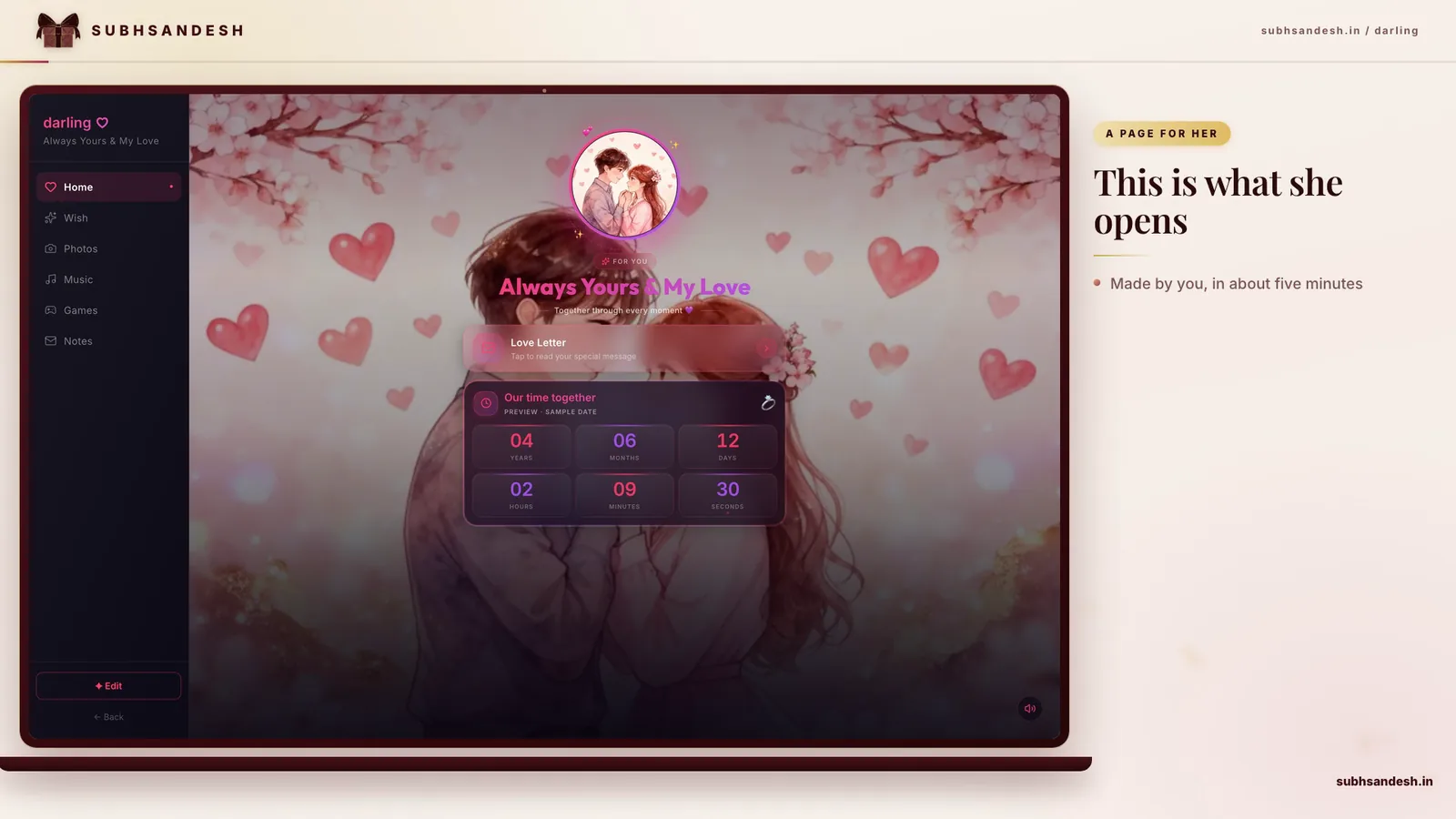
    Want a quick, heartfelt Happy Girlfriend Day GIF-like surprise? Create a beautiful animated page with photos, looping GIFs, music and a private share link. This guide shows simple steps, creative ideas and how to build a private, shareable Happy Girlfriend Day GIF-style page on SubhSandesh in minute

    Suyash Agrahari· 5 min read

    Key takeaways

    • A 'Happy Girlfriend Day GIF' can be a short looping animation or an animated web page that feels like a GIF but carries photos, music and a private link.
    • You can create a GIF-style animated surprise page in minutes by choosing an animated template, adding a looping GIF or short video, a heartfelt message, and music.
    • Animated pages (like SubhSandesh) are easier to personalize, keep private, and look great on phones and WhatsApp compared with single-image GIFs.
    • Best GIF-style pages combine a 3–8 second looping animation, 1–2 meaningful photos, a 20–40 word message, and soft background music for emotional impact.

    Answer-first: Yes—you can create a GIF-style Happy Girlfriend Day surprise that looks like a looping animation but includes photos, a personal message, music and a private share link. This guide shows simple, step-by-step methods to make a heartfelt animated page (GIF-like) and send it in minutes.

    Why choose a GIF-style animated page for Girlfriend Day?

    A looping GIF is immediate and fun, but an animated page gives you everything a GIF can do plus music, multiple photos, a private link and interactive touches. You get the quick smile of a GIF and the emotional weight of a personal note. If you want a small, instantly-watchable moment that also feels curated and private, an animated page is the best option.

    What to expect from this approach

    • A short looping animation (3–8 seconds) that plays like a GIF.
    • One or two favorite photos with light animation.
    • A short headline and a 30–60 word personal message.
    • Optional background music or voice note.
    • A private share link you can send on WhatsApp, SMS or email.

    Quick comparison: GIF vs video vs animated page

    FormatMotion qualityAudioPersonalizationFile size / Shareability
    GIFGood, loopedNoLimited (overlay text)Small to medium, can be large if long
    Short MP4Smooth, high qualityYesModerateSmall and efficient on social apps
    Animated pageSmooth + controlsYesHigh (photos, text, countdown)Very shareable via link; low friction

    Step-by-step: Make a GIF-style Happy Girlfriend Day page (7 steps)

    1. Choose a mood and template. Decide soft-romantic, playful or dramatic. If you prefer romance, pick templates that highlight photos and a headline.
    2. Pick a looping visual. Use a 3–6 second GIF or a short MP4 clip that loops naturally — a gentle zoom, heart pulse, or a candid laugh works well.
    3. Select 1–2 photos. Choose clear images with good lighting: a casual selfie, a candid moment or a favorite portrait.
    4. Write a short headline and message. Keep the overlay headline to 6–12 words and the supporting message to around 30–60 words for mobile readability.
    5. Add audio (optional). Upload a 20–40 second instrumental, a song snippet you both love, or a heartfelt voice note.
    6. Preview on mobile. Verify loop quality, audio level and text readability on a phone screen.
    7. Publish and share privately. Send the private link on WhatsApp or message so she sees the full animated experience.

    These steps mirror how SubhSandesh templates guide you: pick a style, drop in media, write a short message and publish a private link.

    How long will it take?

    If you gather photos and a short clip first, the build itself takes 8–15 minutes. Preparing images may add a few minutes, but the end result is a polished, personal page she can open on any phone.

    Creative ideas for your Happy Girlfriend Day GIF-style page

    • The memory reel: quick 3-second montage of three favorite photos with a headline “Our best little moments.”
    • The countdown tease: a looping heart animation plus a small countdown to your next date.
    • The inside-joke loop: a clip or GIF referencing a shared joke with one loving line.
    • The promise loop: a calm video of you speaking the headline and a written message below.

    Words that land: headline examples

    • "Happy Girlfriend Day, my favourite"
    • "You’re my best day"
    • "Every day with you is better"
    • "Small loop, big love"

    Design tips that feel personal (no design skills required)

    • Use high-contrast photos so faces read clearly on small screens.
    • Choose warm color overlays (pale pink, soft peach) for romance.
    • Keep motion gentle: subtle zooms and fades feel grown-up and intimate.
    • Limit on-screen text and use the page’s body copy for longer notes.
    • Send a GIF file when you want a tiny, immediate reaction inside chat.
    • Send an animated page link when you want privacy, music, multiple photos and richer storytelling. The link opens like a mini celebration that plays on any phone and preserves quality better than sending big GIF files.

    How SubhSandesh makes this effortless

    SubhSandesh offers hand-crafted templates that already feel like GIFs but include music, photos and private sharing. Choose a romantic template from the collection, upload your GIF or short video, add your message and publish. The result is a beautiful, private Happy Girlfriend Day experience she can open on mobile without fuss. Try templates like the romantic Love page or the Valentine page for girlfriend for instant inspiration.

    Troubleshooting common problems

    • If the GIF looks grainy: reduce dimensions slightly or use MP4 for better quality.
    • If the audio won’t play: ensure the file is supported and not too long; some phones mute autoplay audio.
    • If the file is too big to send: publish it on an animated page and share the link instead.

    Checklist before you send

    • Photo faces are clear and well-lit
    • Loop is 3–6 seconds
    • Message is concise and personal
    • Audio is at comfortable volume
    • Previewed on mobile

    Example script and structure you can copy

    Headline: "Happy Girlfriend Day — you’re my favourite" Message: "Every little thing you do makes ordinary days brighter. Thanks for being mine. Can’t wait to hug you soon — love you." Music: Soft acoustic guitar, 20-second loop Visual: 4-second looped clip of you both laughing

    Where to find inspiration and templates

    If you want a ready-made design, browse the SubhSandesh templates to see romantic layouts and GIF-friendly styles. For birthday or milestone variations, check pages like Birthday for girlfriend or Anniversary for girlfriend. Always preview on mobile before you publish.

    Final short note and action

    A Happy Girlfriend Day GIF can be quick and adorable, or it can be the beginning of a rich, private moment that plays like a tiny webpage of love. Ready to make their day? Pick a beautiful template and create your animated Happy Girlfriend Day page in minutes — browse all options at https://subhsandesh.in/templates and publish a private link to share the moment.

    #girlfriend-day#GIF#digital-surprise#romantic-ideas#SubhSandesh

    Frequently Asked Questions

    A 'Happy Girlfriend Day GIF' is a short looping animation or animated web page you send to celebrate Girlfriend Day. It’s quick to view, emotionally immediate and perfect for sharing on WhatsApp or social feeds. For a richer experience, an animated page adds photos, music and private sharing so the moment feels more personal.
    Make a simple Happy Girlfriend Day GIF by choosing a brief 3–6 second loop, adding 1–2 warm images or illustrations, and a short message overlay. Export as a GIF or create an animated web page. SubhSandesh offers ready-made animated templates so you can pick a look, add photos and text, and publish a private link in minutes.
    A plain GIF can be cute but often feels impersonal if it lacks photos or a message. Personal touches — her name, a shared photo or an inside joke — make it memorable. Use an animated page or a GIF with an overlaid photo and short message to create intimacy and context for the occasion.
    Send an animated page when you want more personalization (photos, music, longer message) and privacy; pick a GIF when you want a tiny, instant reaction. Animated pages load well on mobile and allow private links, countdowns, and music — ideal for meaningful Girlfriend Day surprises.
    Keep GIFs between 3 and 6 seconds for best emotional punch and file-size efficiency. Short loops repeat naturally and are easy to watch on mobile. For an animated page, use a 5–10 second looping visual plus a short message and background music for a GIF-like feel with richer context.
    Aim for under 5 MB for a GIF you plan to share on WhatsApp to ensure quick sending and viewing on slower connections. Compress animations, limit frames, and keep dimensions modest (e.g., 480–720 px wide) so the GIF looks good but doesn’t get blocked by network delays.
    Yes—short videos (3–10 seconds) often look smoother than GIFs and can include higher-quality audio. Many messaging apps convert short videos into playable clips. An animated web page with an embedded short video gives you the best of both: visual motion plus background music and a private link.
    Animated pages let you add multiple photos, a personalized message, music, a countdown and privacy controls — all in one shareable link. They appear like a GIF at first glance but deliver much richer context and emotion. SubhSandesh templates turn this idea into a private, elegant page in minutes.
    Match the GIF’s tone to her personality: soft pastel loops for romantic, bold animations for playful, minimalist line art for chic. Consider her favorite colors and inside jokes. If unsure, pick a gentle animated page template that uses neutral romance cues and add a personal photo and message for safer authenticity.
    Yes, you can add your own GIF to an animated page to keep the exact loop you love. Upload a short GIF or MP4 clip and place it where it complements photos and text. SubhSandesh supports uploading GIFs and short videos into templates so your custom animation appears seamlessly on the page.
    Create a loop with a clear start and finish and a soft transition so repetition feels intentional. Use 3–6 seconds, keep motion subtle, and pair it with a fresh message or photo on the page to prevent fatigue. Looping GIFs work best when they accent a feeling, not try to tell a long story.
    Keep text short: a three- to eight-word line like “Happy Girlfriend Day, love” or “You make my days brighter.” Use her name or a small nickname for warmth. If the page allows, include a longer message below the GIF so the overlay stays clean and visually pleasing.
    Pick one or two high-contrast photos with clear faces and crop them into the GIF frame. Apply a subtle animation: a gentle zoom, heart pulse, or soft vignette. Keep image noise low and preserve facial clarity — simple movements make photos feel alive without degrading quality.
    Yes, when optimized for dimensions and file size, a GIF will display well on mobile and WhatsApp. Use modest widths (480–720 px) and keep file size under about 5 MB. For full-screen visual impact and added features like music and private links, an animated page is more reliable across devices.
    A traditional GIF has no audio, so the trick is to use an animated page that supports background music. Choose a soft, 20–40 second loop that matches the mood. SubhSandesh templates let you add music to a GIF-style page so your Happy Girlfriend Day message plays with sound when she opens the link.
    Warmth, affection, playfulness and gratitude work best. Little visual cues — heart icons, warm color palettes, gentle motion — create an emotional tone. Combine one heartfelt line and a favorite photo to amplify sincerity; visuals should support the feeling rather than distract from it.
    Use a template-based builder or mobile apps that offer one-click GIF creation: pick a template, upload a photo, choose an animation style and export. If you want a private, polished result without learning tools, use a SubhSandesh animated template to add a looping animation, photo, and message in minutes.
    Yes—if your relationship is playful, a silly GIF that references an inside joke can be better than a generic romantic message. Match the humor to what she enjoys and avoid anything sarcastic that could be misread. Balance silliness with a short sincere note so the sentiment is clear.
    Create a 3–6 second GIF using a photo or short clip from a shared moment — a trip, concert or candid hug. Add a short caption like “Remember this day?” and place it in a private animated page with a few other photos and a longer message to give context and emotion to the GIF.
    Yes—square (1:1) works well on feeds while vertical (9:16) fits stories. Export the GIF at the aspect ratio suited to the platform you’ll use. When creating an animated page, choose a template that displays well in both portrait and landscape so the page looks great when she opens it on any device.
    Use images or clips that reference things you miss—shared places, voice notes, or little messages. Add a short countdown to your next visit or a simple “Miss you” line. An animated SubhSandesh page with a private link, music and a countdown feels intimate and bridges distance more effectively than a standalone GIF.
    Start with high-resolution photos, limit frames to avoid banding, and export at a moderate size (480–720 px). Use PNG frames if possible and a minimal color palette to reduce dithering. Alternatively, embed a short MP4 into an animated page for better quality with smaller file sizes.
    Standard GIFs don’t support audio, but you can pair a GIF with a voice clip or use an animated page that plays audio. Upload a 10–30 second voice note and set it to play when she opens the page. SubhSandesh supports adding music or voice snippets to templates for a personal touch.
    Soft pinks, warm peaches and muted reds pair well with serif or rounded sans-serif fonts for romance. Keep contrast high enough to read the message and pick fonts with friendly curves. On an animated page, choose a template with built-in typographic rhythm so text reads naturally on mobile.
    Most apps accept GIFs as story content; upload a saveable GIF or short video clip. For profile images, many platforms require static images or short video loops; convert the GIF to an MP4 if necessary. For private sharing and a more crafted experience, use an animated page link instead of a public post.
    Native GIFs can’t be scheduled inside messaging apps, but you can schedule the share of a private page or set a reminder to send the link. Some email and social tools allow scheduled sending. With SubhSandesh, create the page ahead of time and send the link at the moment you want for perfect timing.
    Use clean composition, a short loop, well-chosen type and a consistent color palette. Many template builders offer designer layouts that feel premium with minimal effort. SubhSandesh provides professionally styled templates so your Happy Girlfriend Day presentation looks polished without hiring a designer.
    Yes, an animated page built for mobile will open on both Android and iPhone browsers without additional downloads. Make sure the template is mobile-responsive and files are optimized. SubhSandesh templates are designed to render beautifully across devices so your Happy Girlfriend Day page works reliably for her.
    Yes—create a short slideshow-style GIF that cycles through 3–6 photos within a 3–6 second window or build an animated page that presents multiple photos with subtle transitions. The animated page option gives more space for captions and a longer message to accompany each photo.
    Share GIFs privately via messaging apps or create an unlisted animated page with a private link. Avoid posting personal photos on public feeds unless you’re comfortable. SubhSandesh provides unlisted, private links so only recipients with the link can view your Girlfriend Day surprise.
    Try a short line like “Happy Girlfriend Day—my favourite part of every day.” It’s specific, warm and pairs well with a photo. Keep captions under 10 words for overlay text and use a longer message on the page itself to expand on the sentiment.
    Keep the headline to one short sentence (6–12 words) and the supporting message to 30–60 words. Readers typically scan quickly on mobile, so a focused note with a clear memory or promise carries more weight than a long paragraph.
    Yes—animated pages can include small interactive touches like a clickable photo gallery, a countdown, or a mini-game. These elements make the page feel playful and personal. SubhSandesh templates offer simple interactive modules you can enable to make your Happy Girlfriend Day page more engaging.
    Morning messages feel like a sweet day-starter while evening messages can be more intimate. Choose based on her routine: morning if she checks messages early; evening if you want a quiet, romantic moment. Either way, schedule or send your Happy Girlfriend Day page when she’s likely to have a few distraction-free minutes.
    Trim the clip to 3–6 seconds, reduce frame rate slightly, and resize to 480–720 px width. Use GIF export options that optimize colors and limit frames to preserve clarity. For better quality and smaller size, consider exporting as MP4 and embedding it on an animated page instead.
    Use a predesigned template, pick a single photo, add a one-line headline and choose gentle background music. Many templates are built so you can do this in under 10 minutes. SubhSandesh’s ready-made templates let you assemble a GIF-style animated page quickly and publish a private share link.
    Some animated-page builders include simple view counts or link analytics. If tracking matters, choose a tool that shows views or clicks. SubhSandesh provides basic view metrics so you can see if she opened your Girlfriend Day page and how many times it was viewed.
    Use paid or watermark-free export settings in your GIF app or choose a template that does not add watermarks. On animated pages, keep branding minimal and tasteful. SubhSandesh pages are delivered without third-party watermarks, giving your Happy Girlfriend Day animation a clean, personal feel.
    Yes—add a countdown widget to an animated page to mark the days until your next meeting. It creates anticipation and keeps the message forward-looking. SubhSandesh templates offer countdown timers you can set for your reunion date, making your Happy Girlfriend Day page both sentimental and practical.
    Look for apps with templates and one-tap exports: mobile GIF makers, short-video editors, or template-based web builders. If you want a private, polished page rather than a standalone GIF, use SubhSandesh to combine animation, photos and music in a shareable link without learning any design tools.
    Test the GIF on target apps first: WhatsApp, Telegram, Instagram. Use standard dimensions and keep file size small. If any app compresses badly, consider embedding the animation on an animated page and sharing the link so she gets the intended experience regardless of app compression.
    Yes—animated GIFs can use transparency to overlay motion on different backgrounds, but support varies across platforms. Test before sending. For consistent visual presentation across devices, you might place the GIF on a designed page background within an animated template for a reliable display.
    Choose gentle acoustic or instrumental tracks with warm tones and steady tempo. Keep music subtle so it supports rather than overwhelms the message. If you embed audio on an animated page, select a 20–40 second loop and ensure volume defaults to a comfortable level for the viewer.
    Add concise captions or a short transcript below the animation so someone who cannot hear audio still receives the message. Keep lines short and readable on mobile. SubhSandesh pages let you include text blocks and accessible captions to ensure your Happy Girlfriend Day message is inclusive.
    It’s okay if the old GIF still feels relevant and personal. Edit the caption or add a new photo and message to refresh it. Personalization makes reused GIFs meaningful again. Consider pairing the old GIF with a new short voice note or a private animated page to add freshness.
    Limit color palette, smooth transitions, and reduce abrupt cuts. Use short loops with natural start and end frames. If GIF quality suffers, export as an MP4 for smoother playback and embed it in an animated page so the visual stays high-quality on mobile.
    Most standalone GIFs can’t be password-protected, but an unlisted animated page can have access controls. If privacy is critical, publish the page to a private link and protect it with a passphrase or keep it unlisted, ensuring only those you share it with can view your Happy Girlfriend Day content.
    Subtle zooms, gentle heart pulses, light particle dust, and soft color fades feel tasteful. Avoid overly busy or flashing effects that distract from emotion. Use animation to emphasize a photo or line of text rather than overshadow it; simplicity often looks most elegant for romantic messages.
    Use a short headline in one language and a supporting line below in the other, or create separate pages/GIFs for each language. Keep each caption concise and clear. SubhSandesh lets you place bilingual text blocks so your Happy Girlfriend Day message can reflect both languages naturally.
    Yes—preview before sending so you can test visuals, audio and mobile layout. Most builders offer a preview mode. SubhSandesh allows you to preview your page on mobile and desktop before publishing, ensuring your Happy Girlfriend Day animation looks and sounds just right.
    Create a short animated sequence with 3–5 milestone photos and a brief caption for each, condensed into a 6–10 second loop. Alternatively, build an animated page that presents the timeline in a scrollable layout with richer descriptions and photos for each milestone.
    Simplicity often feels more genuine—choose one clear visual and one heartfelt line. Over-editing can distract. For more storytelling, use an animated page where you can combine a short loop with additional photos and a longer message without overcrowding the main visual.
    Choose gentle visuals and sincere, specific wording. Avoid ambiguous humor or sarcasm that could be misread. If in doubt, pair the GIF with a clear personal message on an animated page that explains your intent warmly and reduces the risk of being mistaken.
    Yes, but ensure you have the right to use licensed music publicly. For private pages, many creators still respect licensing. Use royalty-free tracks or get permission to avoid copyright issues. SubhSandesh supports adding your music files, and choosing licensed or royalty-free pieces is recommended for safety.
    Place a discreet line of text or a tiny handwritten-style graphic in the corner of the frame. Keep it subtle so it doesn’t distract. On an animated page, add a small closing paragraph or voice note with your name and a warm sign-off to make the message feel intimate.
    Standard GIFs always loop the same way. To vary the experience, create an animated page that can cycle through multiple animations or show randomized photos each time it’s opened. SubhSandesh templates can simulate variety by presenting different elements in sequence for repeated views.
    Embed the GIF into an animated page that acts as an e-card, adding a headline, longer message and photos. This keeps the quick impact of the GIF while giving space for a more personal note and optional music or countdown for a richer Girlfriend Day greeting.
    Avoid overly long loops, poor image quality, unclear messages and loud music. Don’t send public posts if you mean to be private and check file size for messaging compatibility. Use a clean layout and personal touches so your GIF feels genuine rather than generic.
    Use a unique photo, an unexpected but sweet message, or a short voice clip on an animated page to create an emotional pause. Bright but tasteful visuals and her name in the headline can make the GIF feel custom and grab attention amid many messages.
    GIFs can lose color depth and sharpness compared with MP4 videos, especially with detailed photos. For better quality and smaller files, export a short MP4 and embed it on an animated page. This approach keeps visual quality high while providing GIF-like motion.
    Animate a short phrase like “You + Me” with gentle fades or typewriter effects over 3–5 seconds. Keep the font legible and use subtle motion. Place the text over a soft background or photo and pair it with a longer message on the page for context.
    Optimized GIFs and short videos load quickly; avoid very large files. Animated pages built with compressed media perform well on mobile networks. SubhSandesh templates are designed for mobile speed, ensuring your Happy Girlfriend Day page opens fast even on modest connections.
    Preview the GIF on both Android and iPhone and send it to yourself or a friend to check quality, looping and file size. If using an animated page, preview in mobile view. SubhSandesh lets you preview pages on different device formats before publishing the final link.
    Create a short GIF that cycles through 3–5 photos quickly, or embed a slideshow within an animated page that users can tap or autoplay. The animated page provides better control over pacing and gives space for captions and a longer message.
    Use an appropriate color palette and test on common devices. GIFs are limited in color depth, so reduce gradients and use solid colors for reliable results. For full-color fidelity, use a short MP4 in an animated page so colors remain accurate and rich.
    Yes—add a tiny logo or signature if it’s part of a gift or collaborative project, but keep it unobtrusive. For personal romantic messages, avoid corporate branding. On an animated page you can include a small footer credit without disrupting the romantic aesthetic.
    Plan a two-stage loop: start with a neutral image, then reveal a photo or message near the end. Keep the change subtle and joyful. A reveal works brilliantly on an animated page where you can add supporting text and music that heighten the moment.
    Yes—animated pages can include simple interactive elements like polls or a “pick your favorite memory” quiz. These features add playful engagement. SubhSandesh supports interactive modules so your Happy Girlfriend Day page can invite her to choose favorite moments or respond to light questions.
    Avoid rapid flashes, high-contrast strobes, and quick cuts. Use smooth fades, soft palettes and slower motion. If in doubt, add a note on the page indicating the animation is gentle. You can also provide a static image alternative on the animated page for sensitive viewers.
    Yes—embed the GIF in a private animated page and use any available view metrics to see opens. For richer feedback, add a short reaction button or comment area on the page. SubhSandesh offers private sharing and simple analytics so you can see how your Happy Girlfriend Day page performs.
    Place a discreet link or button on the animated page that leads to a gift registry, booking or checkout. Keep the focus on the message; present the gift as an optional extra. SubhSandesh pages allow clear buttons and links so you can pair a heartfelt GIF with a thoughtful gift action.
    Use a themed template built for the occasion, add a looping GIF or short clip, and include a short headline and message. For Girlfriend Day or anniversaries, choose templates like the romance-focused [Love page](https://subhsandesh.in/love-gf) or an anniversary layout such as [Anniversary for girlfriend](https://subhsandesh.in/anniversary-gf). Browse all templates at https://subhsandesh.in/templates for quick inspiration.
    SubhSandesh provides polished, mobile-ready templates that feel like animated GIFs but include music, photos and private links. Pick a template, upload a GIF or short video, add a message and publish a private link in minutes. Templates make the process fast, giving you a designer feel without the work.
    Yes—SubhSandesh templates offer countdown widgets so you can build suspense for a reveal or planned meetup. Set the target date and the page displays a live timer. It’s an easy way to make your Happy Girlfriend Day page feel event-like and memorable.
    Yes, SubhSandesh allows you to upload your chosen audio clip to play alongside animations. A short, meaningful song or voice note helps your message land emotionally. Just make sure you have the right to use the track; royalty-free choices are safest.
    Yes—publish your page and share the private link on WhatsApp. The recipient will open a GIF-like animated experience with music and photos. This method avoids file-size limits and preserves quality better than sending large GIF files directly.
    You can assemble a polished, animated Happy Girlfriend Day page in under 15 minutes: choose a template, upload a GIF or photo, add a short message and music, preview and publish. SubhSandesh templates streamline the process so you can focus on the sentiment rather than the design.
    SubhSandesh

    Turn this inspiration into an unforgettable surprise

    Build a page with photos, a heartfelt message, music and a ready-to-share link.

    • Photos, message & music
    • Ready-to-share link
    See all occasions
    Suyash Agrahari

    Written by

    Suyash Agrahari

    Founder

    Suyash Agrahari is a Software Engineer at HireQuotient and the founder of SubhSandesh and DrawFlow (drawflow.in). He builds AI agents and full-stack products with Next.js, Node.js, and the OpenAI and LangChain ecosystems, having shipped autonomous multi-agent systems, AI copilots, and large-scale outreach platforms — and scaled side projects from a few hundred to millions of users. He writes about AI engineering, web development, and building products that grow through SEO and organic reach.

    Keep reading